
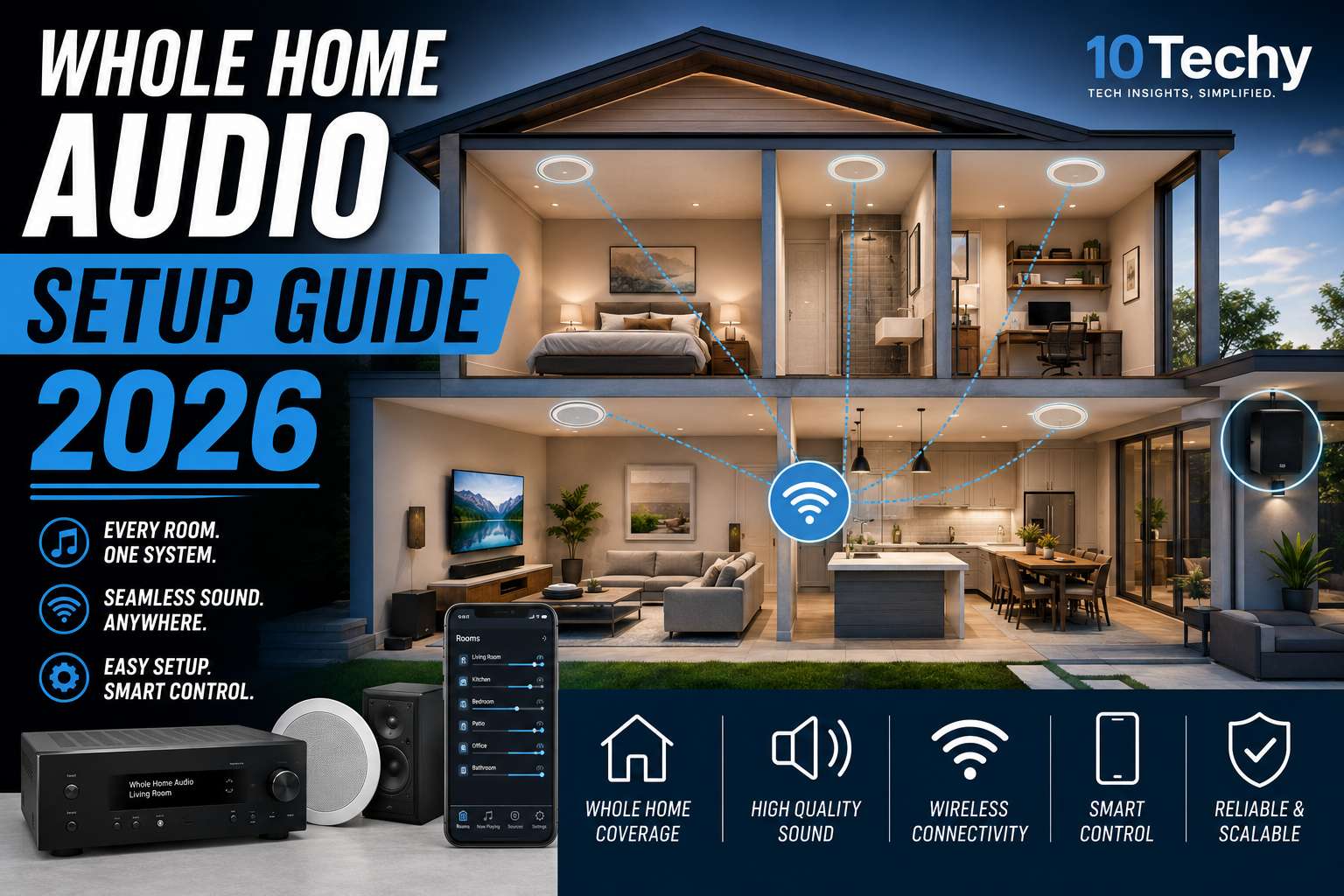
Most people shopping for whole home audio make the same mistake: they start buying speakers before deciding on a system. You pick up a Sonos speaker here, a Bluetooth device there, and within a month, you have three apps, two dead zones, and a kitchen that plays music only when it feels like it.
The issue is not the hardware. The issue is skipping the plan. A real whole-home audio system is a unified network. It plays synchronized music across every room, routes different audio to different zones independently, and runs without you thinking about it.
Building one correctly takes about 30 minutes of planning and saves you hundreds of dollars in wrong purchases.
This guide covers every decision, infrastructure, ecosystem, room types, amplification, smart home integration, and network setup, so you can buy once and set it up right.
Quick Answer: What Does a Whole Home Audio System Actually Need?
Short answer: Three things. A control hub (Sonos, WiiM, Denon, or Home Assistant), a reliable Wi-Fi mesh network (not Bluetooth), and speakers matched to each room’s acoustic purpose.
You do not need a receiver in every room. You do not need the same brand everywhere. You do need those three things locked in before purchasing anything else.
Wired vs. Wireless: The Decision That Shapes Everything
This is the first question to answer, and your answer depends entirely on your home’s current state, not on what sounds better on paper.
If You Are Building New or Doing a Full Renovation: Go Wired
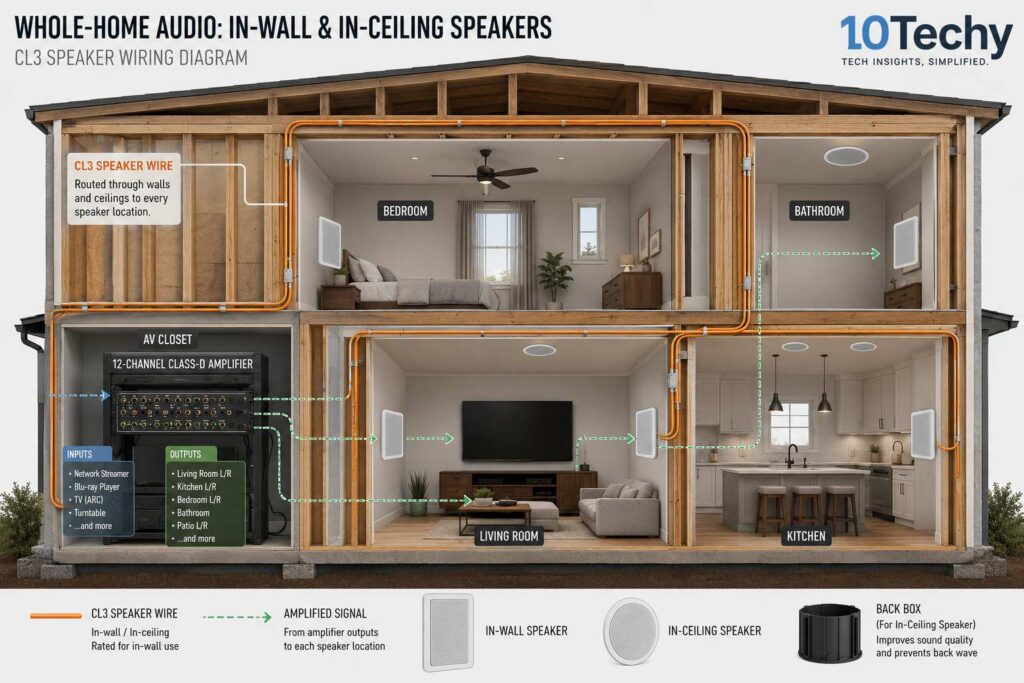
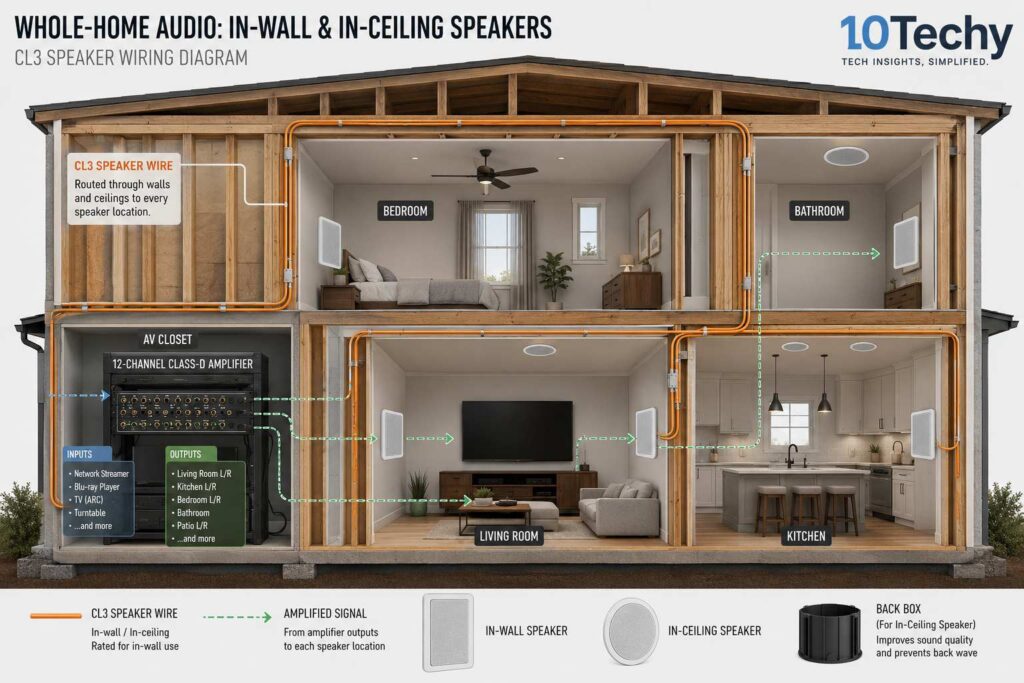
Open walls are a one-time opportunity. Run CL2 or CL3 fire-rated speaker wire through the studs before drywall goes up. Terminate everything at a central AV closet housing a rack-mounted multi-channel distribution amplifier.
A 12-to-16 channel Class-D amplifier drives passive speakers throughout the entire house from one hidden location. No visible equipment in living spaces. No wireless dropouts. No latency. No Bluetooth pairing. Just clean, uncompromised audio in every room.
The tradeoff is real: professional installation runs $3,000–$6,000 for a complete setup, and you are locked into that wiring footprint. But you also never troubleshoot it again. For new construction, hardwired is always the right answer.
If You Have a Finished Home: Go Wireless
Spray foam insulation, brick walls, and finished ceilings make hardwiring expensive and often impossible in existing homes. The wireless path is not a compromise; it is the right choice for your situation.
You place powered (active) speakers in each room, plug them into electrical outlets, and connect them over Wi-Fi. Modern wireless systems are stable, support lossless audio, and scale room by room as your budget allows.
One thing to be clear about: Bluetooth is not the same as Wi-Fi audio.
Bluetooth drops beyond 30 feet. It cannot carry lossless audio formats. It disconnects when your phone receives a call. Wi-Fi audio runs at 100+ feet, supports FLAC and ALAC, and keeps playing even if your phone leaves the house. If someone suggests Bluetooth for a whole home system, stop listening to them.
Choosing Your Ecosystem: Sonos, WiiM, Denon HEOS, or Open-Source?
Pick one platform and commit to it. Mixing ecosystems, grouping a Sonos speaker with a Denon HEOS unit for synchronized playback, does not work reliably. You will get latency mismatches, synchronization failures, and app conflicts.
Here is how each ecosystem actually stacks up:
Sonos, Best for Simplicity and Non-Technical Users
Sonos runs on its own proprietary wireless mesh called SonosNet. When you wire one Sonos device to your router via Ethernet, every other Sonos device in the home joins a dedicated audio-only mesh network. This is why Sonos is stable; it is not competing with your laptop and phone for bandwidth.
The app is genuinely intuitive. A first-time user can group rooms, adjust volumes, and switch sources in under a minute. Hardware spans from the $179 Era 100 speaker to the $899 Arc soundbar, covering every room type.
The weaknesses are real. Each zone costs $200–$400 minimum. The ecosystem is closed; you are entirely dependent on Sonos for software updates, and the 2024 app redesign introduced months of instability that users are still talking about. If Sonos discontinues a product, your device becomes a paperweight eventually.
Best for: Design-conscious buyers, non-technical users, households that want everything to just work without thinking about it.
WiiM, Best for Audiophiles Who Want Value
WiiM devices are network streamers; they handle the digital processing and hand a clean analog signal to a separate amplifier and passive speakers. The WiiM Pro Plus supports FLAC, ALAC, and MQA lossless formats natively. The WiiM Ultra includes an ESS Sabre DAC that delivers measurably better audio than most all-in-one wireless speakers at any price.
You pair a WiiM device with a Class-D amplifier (brands like Fosi Audio or SMSL at $100–$300) and passive bookshelf or in-wall speakers. Total cost per zone typically runs 30–40% less than an equivalent Sonos setup, with superior fidelity. WiiM also supports AirPlay 2 speakers natively, making it flexible for Apple households.
The catch: you are assembling components. This requires basic knowledge of amplifier impedance, speaker matching, and cable runs. If that sounds like work rather than fun, Sonos is the better fit.
Best for: Audiophiles, value-focused buyers, homes with existing passive speaker infrastructure.
Denon HEOS, Best for Home Theater Integration
If your living room already runs on a Denon or Marantz AV receiver, HEOS is the logical expansion. The receiver becomes Zone 1. HEOS-enabled wireless speakers or multi-zone distribution amps extend audio to the rest of the house without replacing equipment you have already invested in.
The real limitation: Denon’s firmware on older units has struggled with the computational demands of modern streaming platforms. Limited RAM and flash storage in hardware from 2018 to 2021 creates sluggish app performance, zone grouping failures, and dropped service access.
If your receiver is from that era, pair it with an external WiiM streamer instead of relying on the internal HEOS processing.
Best for: Users already invested in Denon or Marantz home theater equipment.
Home Assistant + Open-Source, Best for DIY Control Freaks
Home Assistant running on a NUC or Raspberry Pi gives you total local control, no cloud dependency, and integration with virtually any hardware through the Music Assistant plugin. Open-source setups like AmpliPro add REST API control for legacy keypads and rack-mounted amplifiers.
The tradeoff is steep. Every configuration is your responsibility. Troubleshooting requires comfort with YAML, Docker, and networking. If those words mean nothing to you, start with Sonos.
Best for: Software engineers, privacy advocates, smart home enthusiasts who want zero vendor dependency.
Ecosystem Comparison at a Glance
| Ecosystem | Sonos | WiiM | Denon HEOS | Home Assistant |
|---|---|---|---|---|
| Setup Difficulty | Easy | Moderate | Moderate | Advanced |
| Cost Per Zone | $200–$400 | $100–$250 | $150–$350 | Varies |
| Audio Quality | Very Good | Excellent | Good | Excellent |
| Lossless Support | Yes (Era/Move 2) | Yes (native) | Partial | Yes |
| AirPlay 2 | Yes | Yes | Partial | Via plugin |
| Cloud Dependency | High | Medium | High | None |
| Best For | Simplicity | Fidelity + Value | HT integration | Full control |
Room-by-Room Hardware Strategy
Every room has different acoustic requirements. Treating them identically is where most whole-home audio setups go wrong.
Living Room
This room does the most acoustic work. It handles music, TV audio, and film, each requiring different speaker configurations.
For wireless setups, a premium soundbar with a dedicated wireless subwoofer handles the primary stereo and surround workload. Discrete rear channels, even compact shelf speakers like Sonos Era 100s placed behind seating, add genuine spatial depth for Dolby Atmos content. The center channel is non-negotiable if you watch dialogue-heavy content; without it, speech competes with music and effects for clarity.
For hardwired setups, a full AV receiver driving floor-standing fronts, a center channel, and in-wall rears delivers the best result. This is also the room where investing in room correction software, Dirac Live on Denon/Marantz, or Audyssey XT32, pays back the most, because reflective surfaces in living rooms are almost impossible to control acoustically.
Kitchen and Dining Area
Kitchens need diffuse, ambient coverage. You move constantly, stand in different positions, and have no fixed listening spot. A single directional speaker will sound loud directly beneath it and thin everywhere else.
The right solution: ceiling speakers with dual-tweeter stereo configurations. These output both left and right channels from one enclosure, so wherever you stand in the room, you hear the full mix. A hidden Sonos Amp in a cabinet or pantry powers passive ceiling speakers cleanly without visible equipment.
Avoid freestanding speakers in kitchens. They consume counter space, accumulate grease, and create a safety hazard near sinks. Ceiling-mounted is always the right call.
Bedroom and Home Office
These rooms call for focused, near-field listening, clear imaging for music at moderate volume, not room-filling power.
A bookshelf speaker pair powered by a quality stereo receiver or compact integrated amplifier delivers better stereo imaging than any soundbar or all-in-one wireless speaker at the same price. In a bedroom, a WiiM Mini or Sonos Port connected to a vintage integrated amp is a genuinely excellent combination, modern streaming with analog warmth.
Offices specifically benefit from near-field speaker placement. Speakers positioned at ear height, angled inward at roughly 30 degrees, at a distance equal to the speaker separation, create a precise stereo image that helps with focus rather than distracting from it.
Outdoor Zones
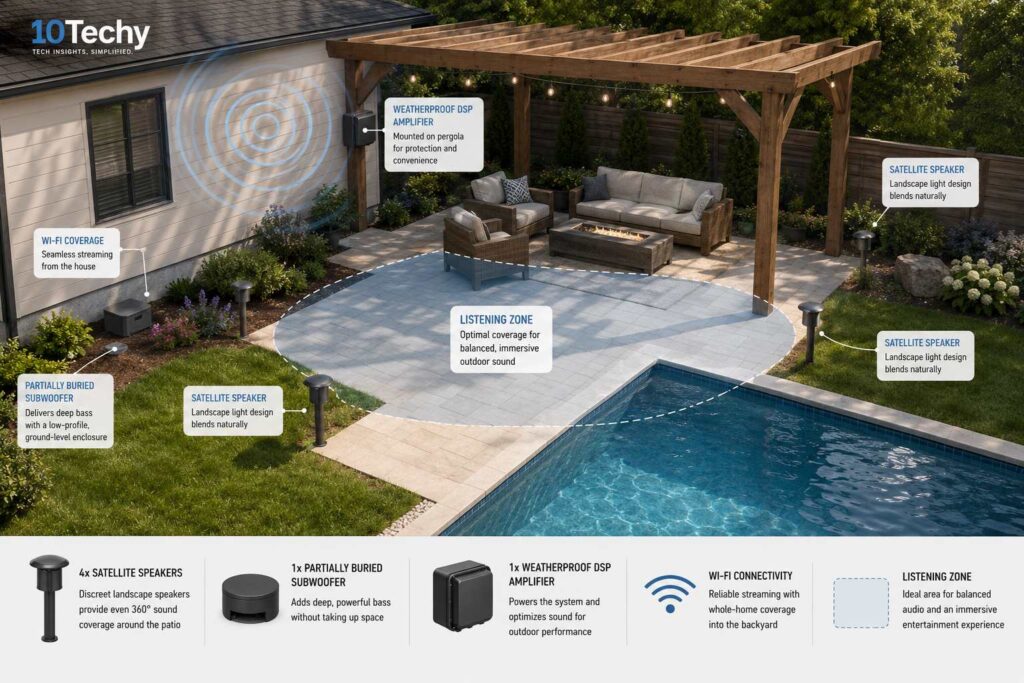
Open air is the hardest acoustic environment. Bass frequencies dissipate rapidly without walls to contain them. A Bluetooth speaker that sounds loud indoors will sound thin and weak covering a 20-foot patio.
Permanent outdoor systems use multiple satellite speakers positioned around the perimeter, aimed inward at seating areas. A dedicated ground-level or buried subwoofer handles bass that outdoor satellites cannot reproduce alone.
DSP amplifiers apply equalization specifically calibrated for open-air acoustics, boosting low frequencies and taming harsh high-frequency resonance that open environments amplify.
The whole outdoor system connects back to your home’s primary network, extending your interior playlists outside without a separate system or app.
Amplification, DACs, and Audio Fidelity
The amplifier and digital-to-analog converter set the ceiling of your system’s sound quality. Even perfect speakers cannot overcome a poor signal chain.
Lossless audio matters, but only if your DAC can handle it. Apple Music, Tidal, and Amazon Music HD now deliver FLAC and ALAC files at 24-bit/192kHz. These files preserve the full frequency spectrum (20Hz–22kHz) and dynamic range of the original studio master.
Budget DACs introduce jitter, microscopic timing errors in digital conversion, that effectively erase the quality advantage you paid for a streaming subscription to access. WiiM Ultra’s ESS Sabre chip eliminates this. Most all-in-one Bluetooth speakers do not.
Class-D amplifiers are the right choice for multi-room installations. Class-AB amplifiers are warmer-sounding but generate significant heat. In a sealed AV closet driving 8–12 zones, thermal buildup is a real failure risk. Class-D amps run at 90% electrical efficiency with minimal heat output, and you can stack 12–16 channels in a slim rack chassis without ventilation concerns.
One technical point worth understanding: impedance matching. Wiring too many passive speakers in parallel to a single amplifier channel drops the combined impedance below safe operating levels. The amplifier draws excessive current, clips the signal, and can fail catastrophically. For multi-speaker zones, use impedance-matching volume controls or a proper speaker selector switch, not a raw parallel wire run.
Smart Home Integration and Room Calibration
Voice control works best when it lives inside one ecosystem. Alexa, Google Assistant, and Siri all work with Sonos, WiiM, and HEOS, but cross-ecosystem grouping via voice is unreliable. Saying “Alexa, play jazz everywhere” might work for Sonos rooms, but skip WiiM endpoints. Pick one voice platform and build your audio system around it.
Room calibration is not a luxury feature. Every room has a frequency response shaped by its geometry, furniture, flooring, and wall materials. Hardwood floors and glass windows create sharp reflections that emphasize harsh upper-midrange frequencies. Room corners create standing waves that dramatically boost bass at specific frequencies, making music sound muddy and undefined regardless of speaker quality.
Software like Sonos Trueplay (uses your iPhone microphone) or Dirac Live (on Denon and Yamaha AVRs) measures these acoustic anomalies and applies corrective EQ automatically. The improvement is audible and immediate, especially in kitchens, home offices, and living rooms with reflective surfaces. Do not skip this step.
Network Setup and Common Failure Points
Your home router is probably not enough. A standard ISP-provided router has a limited range and shares bandwidth between audio, streaming, browsing, and smart home devices. Multi-room audio, especially lossless formats across 4+ zones, needs dedicated bandwidth and consistent signal strength.
Install a mesh Wi-Fi system: Eero Pro, Ubiquiti UniFi, or Google Nest Wi-Fi Pro. Place nodes to eliminate dead zones in every room where a speaker lives. This single change fixes more “whole home audio problems” than any speaker or amplifier upgrade.
For Sonos specifically: plug one Sonos device into your router via Ethernet cable. This activates SonosNet, a dedicated 5GHz mesh network that exists only for Sonos devices and does not share bandwidth with the rest of your network. Every other Sonos speaker in range joins this mesh automatically. Connection stability improves dramatically.
For legacy home theater receivers being incorporated into a modern wireless system, do not rely on the receiver’s built-in streaming apps if the unit is older than 2021. Connect a WiiM Mini to its optical or analog input instead. The WiiM handles all streaming processing, the receiver handles amplification, and you bypass the firmware limitations entirely.
Common Mistakes That Waste Money
Buying speakers before deciding on an ecosystem. You end up with hardware that does not group, sync, or work within the same app.
Using Bluetooth for a multi-room system. The range is too short, the audio quality is compressed, and synchronization between multiple Bluetooth speakers is unreliable.
Ignoring room acoustics. Spending $800 on speakers and placing them in a room with hardwood floors, bare walls, and glass windows will sound worse than $300 speakers in a well-treated room.
Running passive speakers in parallel without impedance management. This does not save money. It destroys amplifiers.
Buying the same speaker type for every room. A living room needs directional, high-fidelity performance. A kitchen needs diffuse coverage. A bedroom needs near-field imaging. Same speaker, wrong result in two out of three rooms.
FAQs
Can I mix Sonos and non-Sonos speakers in the same system?
You can have both in your home, but they will not group for synchronized playback. Sonos speakers group only with other Sonos speakers. Non-Sonos devices, including WiiM, HEOS, and standard AirPlay speakers, operate as separate systems. If synchronization across all rooms is the goal, commit to one ecosystem throughout.
What is the difference between in-wall and ceiling speakers?
In-wall speakers mount vertically in walls and project sound horizontally into the room, better suited for home theater surround channels and dedicated listening rooms. Ceiling speakers mount horizontally overhead, and project sound downward, creating uniform coverage for kitchens, hallways, and transitional spaces. For ambient background music across a large open plan, the ceiling is the correct choice. For focused listening or home theater surround use, in-wall performs better.
How much does a whole home audio system cost?
Entry-level wireless setup (2–3 zones, Sonos or WiiM): $500–$1,000. Mid-range wireless (4–6 zones): $1,500–$3,000. Full hardwired installation with professional labor: $4,000–$8,000, depending on home size and number of zones. Outdoor audio adds $800–$2,500, depending on coverage area and whether burial-rated subwoofers are included.
Do I need a separate amplifier for every room?
No. In hardwired systems, a single multi-channel amplifier drives 6–16 zones. In wireless systems, amplification is built into each active speaker; you are paying for it per zone, but there is no central amplifier to maintain. The modular nature of wireless systems lets you add zones one at a time as budget allows, which is its practical advantage over hardwired systems.
Is a wired or wireless system better for audio quality?
Hardwired systems with quality passive speakers and a dedicated multi-channel amplifier can outperform wireless at equivalent price points because there is no wireless compression or protocol overhead. However, modern Wi-Fi audio with lossless streaming (WiiM Ultra, Sonos Era 300) is genuinely excellent; the gap has narrowed to the point where most listeners cannot distinguish the difference at moderate listening volumes. The bigger quality driver is speaker quality and room acoustics, not wired vs. wireless.
Can I use my old stereo receiver in a whole-home audio system?
Yes. Connect a WiiM Mini or Sonos Port to the auxiliary or optical input of any stereo receiver. The receiver handles amplification for your existing passive speakers. The streaming device handles the modern app control, multi-room grouping, and lossless audio support. This is one of the most cost-effective ways to upgrade an existing setup without replacing working equipment.
What happens if Wi-Fi drops in a wireless system?
Playback stops or stutters. This is the core vulnerability of wireless systems. The solution is a mesh network with strong coverage in every room, not a signal-boost extender. Extenders introduce latency; mesh nodes create a seamless single network. Invest in proper mesh networking before spending on premium speakers; it has more impact on daily reliability than speaker brand.
Final Recommendation
Building new or doing a full renovation: Wire the walls now. It is the only time you can do it cost-effectively. Pair with WiiM for audiophile performance or Denon HEOS if your living room centers on a home theater receiver. Budget $4,000–$8,000 for a complete professionally installed wired system, and you will not touch it for 15 years.
Retrofitting an existing home, moderate budget: Start with Sonos. The Era 100 in the bedroom and a Sonos Amp driving passive ceiling speakers in the kitchen give you a two-zone system that genuinely works for under $700. Add zones as the budget allows. Every device you add strengthens the SonosNet mesh and improves overall stability.
Audiophile or value-focused buyer: WiiM Pro Plus plus a Fosi Audio V3 amplifier plus a quality passive bookshelf speaker pair delivers better sound per dollar than anything Sonos offers at an equivalent price. It takes an afternoon to set up properly. The result is a system you will not feel the need to upgrade.
Home theater first, music second: Denon HEOS centered on a current-generation Denon AVR X-series receiver is the natural choice. Your living room is already anchored. HEOS extends it cleanly.
The best whole-home audio system is not the most expensive one. It is the one that matches your home’s structure, your technical comfort level, and how you actually use it every day. Plan that first. Buy the second. The hardware follows the plan, not the other way around.


